We've moved!

You will be automatically redirected to the new address. If that does not occur, visit
http://www.techimperial.com
and update your bookmarks.

Showing posts with label save. Show all posts

Wednesday, November 16, 2011

Free Texting on your iPhone with Google Voice, Tlert & SMS GV Extension

Free texting for the whole family with Google Voice™ on the iPhone!

I wanted to write about this awhile back, it's actually pretty cool, I didn't realize how easy it was to enable native texting (not using any 3rd party apps) with my Google Voice™ account on my iPhone, when I found out, I liked it, although I don't use it anymore, but if I ever had to, I definitely would.

This is a pretty simple procedure to follow and only requires installation of three apps, your iPhone must be jail-broken and you must have a data plan or WiFi connectivity. (You do not need to be jail-broken if you are fine with using the Google Voice™ app every-time you want to text someone, simply ignore all the steps and install Google Voice™ from the App Store)

You will need to have a Google Voice™ account in order to use this functionality. Follow the steps below if you want to be able to SMS without opening an app.

    Instructions
  1. First, you will want to install Google Voice™ from the official App Store.
  2. Now you must install an app called Tlert from Cydia it's in the ModMyi repository. Please keep in mind that Tlert is not free, it comes with a price of $6.99, if for some reason you cannot afford Tlert there is a legal patch you can grab through Banned iPhone repository. (If you use the patch you must make sure that Tlert is installed even as trial and then make sure Tlert is disabled before you install the patch and you have rebooted and re-enabled Tlert)
  3. After you have installed Google Voice™ and Tlert you should now be ready for the final steps, make sure you have the BigBoss repository installed on Cydia.
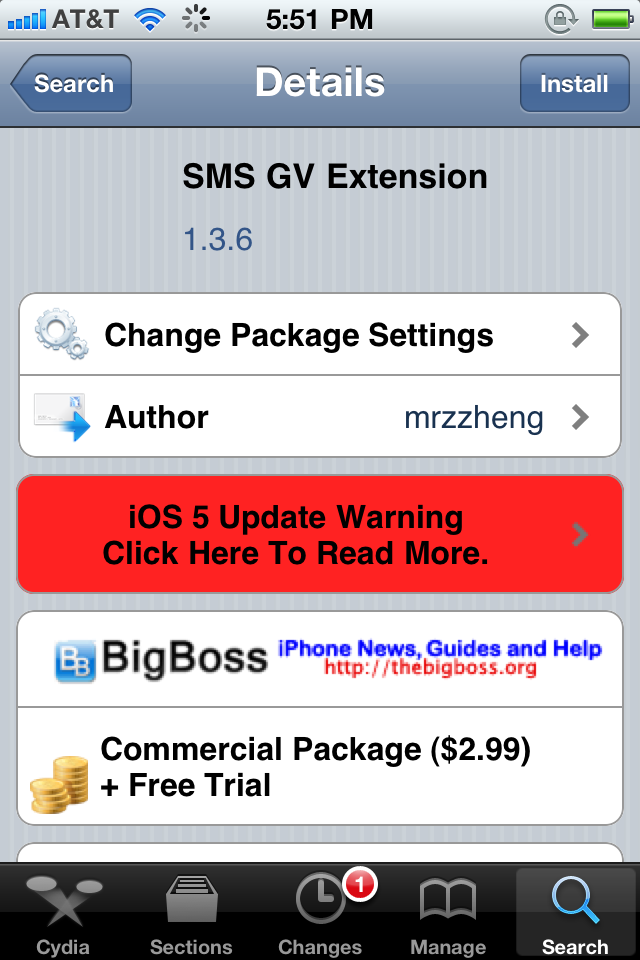
  4. Alright, open up Cydia and search for SMS GV Extension. It costs $2.99, it also includes a free trial, this adds Google Voice™ messaging capability to the device's SMS module. The website for it can be found here.
  5. Congratulations, you've completed all of the previous steps, you're going to want to optimize your settings now, look below to set everything up perfectly.

    Configuration
  1. Open Tlert, make sure enabled is toggled on.
  2. Now click on "Activate Compose", it'd be best to use the Volume Buttons "Down, Up" to send an SMS through Tlert, so check it and go back, then hit Apply.
  3. Now go to the Settings app, click on "Notifications", click on "Google Voice" and enable "Alerts".
  4. Finally go back to the Settings app and scroll down to "SMS GV Extension", click on it then input the e-mail address you use to login into Google Voice with password.
  5. Toggle "Enable Send" to on. Toggle "Check License" on. Click Receive Settings and Toggle "Official GV app" on, "Local Mail" off, "Refresh Cache" on.
  6. Now go back to Settings and re-spring your device.
  7. Open the "Google Voice" app and make sure the same account you used on "SMS GV Extension" is logged in through the app, you can now exit the app after logging in.
  8. Finally test it out, have someone text your Google Voice number and see for yourself.


If you have any problems figuring this out or installing any of the above, drop a comment and I'll be happy to help you out.

Saturday, July 3, 2010

Every Penny Counts

In this article we discuss how you can find any item you want at the best price using the Internet

Have you ever wondered how you would get that new Bluetooth Stereo Headset or even that dreaded 16GB MicroSDHC card for your smart phone? Well in this brilliant era of technology we humanoids now have options!

Wait. Stop. Did this guy just say we have options?

YES!

You may just be able to scoop that jeweled laptop just yet... While having an understanding of your options on the internet today you must also ask yourself, if I'm going to be a smart shopper what else besides price will I need to know?


    Options
  1. E-Bay (Public auction website)
  2. Craigslist (Local internet rummage sale)
  3. Amazon ($uper saver surprises at every outlet)
  4. Google Shopping™ (Last resort to hunt down that bargain)
  5. Woot.com (Random daily deals, nothing all that great except the roombas)

Well those are 5 great options to choose from, the latter is just a daily deal where they do a price cut on any randomly selected item so cross-it out as an option for finding what YOU WANT. Since we have that out of the way, now it's time to question the reputability of these options. The first 4 all have similarities in the way they sale their items, although they also have unique features, E-Bay likes to provide you with a protection service, Craigslist just wants you to find something, Amazon lets many stores sell through them and Google Shopping is just that.

But, that's just not enough information to buy something through their service, is it? In order to be the ideal deal finder you need to ask questions about your product. Is it a tech gadget? Is it supposed to have batteries? Was it opened or used before? Where's it shipping from?

Usually everything you need to know about the item is posted in the description and you'll be fine. But, on there other hand there are those cheap imitations we call knock-offs circulating the Internet. First and foremost anything shipping from Hong Kong through E-Bay is probably a deal breaker right off the bat... Not only do you have to wait a week for arrival, but you are taking a chance to buy something from one of the best imitation markets in the world.

Something as generic as a 32GB usb which goes for $60+ in the US goes for about $14 there, wonder why? KNOCK-OFFS!

Be safe, shop smart. Also remember to modify your search if you're unhappy with the results the first time around, a good example of this would be:

Search 1: hp mini 311 would come up with results, but we want the exact item we're looking for, is there anyway we can modify the search to incorporate more details that make this item stand out?

Search 2: hp mini 311-1023NR; whoa the exact model # actually means something to these search databases. >:)

Above is just another way to successfully find your item. Many of these websites mentioned also provide a price/relevancy filter which you can apply if you want cheaper.

One final thought I'd like to mention is the results, make sure to skim through them in a precise manner if saving money means that much to you. You could end up missing that $100 reduction if you don't read carefully.

P.S. When buying through Craigslist, be sure the seller can verify the item and if it is a gadget be aware it could have complications you'll soon realize later on, so check it good.

Don't Dubai, do buy. (Yes, I've coined it).