We've moved!

You will be automatically redirected to the new address. If that does not occur, visit
http://www.techimperial.com
and update your bookmarks.

Friday, April 27, 2012

Tlert Themes and Skins

New Tlert Skins and Themes for your iPhone, iPad, iPod

Download new Tlert themes and skins.

In an earlier post I mentioned Tlert, a great iOS App that lets you receive, reply and compose text messages and multimedia messages anywhere on the device without interrupting what you are doing or the bother of switching between the Messages App and your currently open App.

Since I have been using Tlert for quite a while, I decided to look for some new themes, intelliborn provides a few, but those were not really my taste and the Tlert forum was dead on ModMyI, so I decided to make and port my own themes and Tlert skin.

Below you will find the download link to colorful bubble themes and a new Tlert exit button skin, I put them in a hierarchy accordingly so all you have to do is drag and drop the "Tlert.app" folder into the "/Applications/" folder on the root of the device. You can preview the themes before adding them, play with the font colors to integrate it with whatever theme you use, these are very clean themes, I threw in a pink one too for any females out there.

Note: Drop the Tlert.app folder to this location:
/Applications/

Requirements
Tlert (App)
iPhone, iPod Touch or iPad (Hardware)


Thursday, April 12, 2012

Change iPhone text sound, new mail sound, and UISounds (System Sounds) on iOS

Change the iPhone UI sounds with Audacity and Cyberduck.


Have you ever wanted to change the iPhone's default system sounds? Like when you check the Mail App and it downloads new mail you usually hear a ding, or perhaps the famous swoosh sound when sending a text, those are both iOS system sounds, or UISounds on your device.

This guide will show you how easy it is to make any of your audio files into a system sound you can upload to your device and use instead of the default ones.

Note: Always make sure to backup your default UISounds, either by renaming the extension to .bak or by saving them on your computer (SentMessage.caf is the swoosh sound after sending a text, new-mail.caf is the ding you hear when downloading new mail).

Default UISounds Directory:
/System/Library/Audio/UISounds/


Requirements
Audacity (Software)
Cyberduck (Software)
QuickTime Player (Only to preview the .caf audio) (Software)
Jailbroken iPhone (Hardware)

    Instructions
  1. Find the audio file you want to use to replace a default system sound.
  2. Now open the file through Audacity.
  3. Export the file as AIFF (Apple) signed 16 bit PCM type and make sure you add .caf to the end of the file name and click save. A warning box will appear, click yes.
  4. Next, open Cyberduck and SSH into your iPhone or device to the default UISounds directory listed above.
  5. Once you are there, find the sound you want to replace, such as SentMessage.caf.
  6. Rename the original (the one on the device we're replacing) SentMessage.caf to SentMessage.caf.bak to backup the original sound.
  7. Finally, rename the sound you exported in Audacity to SentMessage.caf (It's cAsE SeNsItIvE).
  8. Lastly, upload the exported file to the default UISounds directory and respring your device.
  9. Repeat these steps for any other sounds you want to replace and profit.


Tuesday, April 3, 2012

Purple and green color, resolution fix for old school games

How to fix old games running on Windows 7 from schowing up in purple and green colors, Age of Empires, StarCraft, etc.

StarCraft Classic with the blotchy purple and green resolution problems.

Having a newer computer is always a nice asset for gaming, so we like to think, right? There's just one problem... being a cool hipster and all, you want to play some of those retro and old school games you used to play as a kid, the only thing is the game companies do not update those games anymore and you are in a completely upgraded hardware era.

This is for those games that have purple, green or even blue blotchy areas and seem to be distorted due to resolution or graphics problems.

Now, there are probably a few different ways to fix these types of display issues with older games, but the one I am writing about isn't one of those difficult registry tweaks or the kill explorer trick, those are really tedious fixes and require in-depth computer knowledge, which we do not always have the time to research. As much as I'd love to make things difficult, I am not going that route.

The fix is a neat little tool dubbed "DirectDraw Compatibility Tool" created by a Russian programmer named Лёха Galogen, it applies a one time registry entry for the game you want to fix. All you have to do is download the program and run it, it's pretty simple to use, just find the executable of the game...

Example:
C:\Program Files (x86)\StarCraft\StarCraft.exe

Then, click apply, all done. No more blotchy colors or resolution errors, play the game with nice DirectDraw support. This tool works on both 64 bit and 32bit operating systems, the latest version as of 04/03/2012 is 1.01.

Requirements
DirectDraw Compatibility Tool (Software)


Sunday, February 19, 2012

Add music to your iPhone without syncing via PwnTunes

Now you don't have to sync with iTunes to add music to your iDevice!


After having many Apps installed and using more than one computer, something finally hit a nerve and I said, there has to be a solution to this whole syncing problem; my answer was PwnTunes. I don't think I have to get too technical today, but let me explain a few things first...

Lets say you have over 40 or more Apps and you remove or download more at a later date and then have over 60 Apps, lets also say you had some music on your first sync too, but since that date (maybe a month, maybe weeks) you haven't synced with iTunes. Now, it is no longer a casual sync, it is a task, because it will take you anywhere from 10 to 30 minutes to verify, sync and import the newly downloaded Apps to iTunes from your device, vice versa.

If you are a busy person and on the move quite often, you really don't have that extra time to dedicate to syncing every few days, do you? I like to go to the gym when I have spare time and I need new music, my music library is always growing and syncing can be bothersome.


PwnTunes also supports importing files such as MP3s to your iPod App by downloading them with Safari Download Manager (a cydia tweak) and moving them to the "My Music" folder with an App such as iFile. The same process can be done for importing images into the Photos App. You can even add music from another computer without having to delete your music library (like with iTunes syncing), did I mention you can export your music files too? Yeah, even your purchased songs.

Next time all you have to do is grab your iPhone, iPod Touch or iPad and just connect it to your computer with your usb cord or wirelessly through SSH, it's as simple as dragging the new music into a folder when connected and you can listen to it through the iPod App on your device next time you hit the gym, no more lengthy iTunes syncing! You will need to have "PwnTunes" installed, you can find it on Cydia in the BigBoss repository, it is developed and maintained by SpiritOfLogic. With over 800,000 downloads since conception, we have a real keeper here.

PwnTunes is the only tweak and Cydia App that can successfully import your new music files through drag and drop interface, natively from your operating system, who doesn't like the sound of that? No more checking if you synced the right Apps or that you backed up the right things, just drag and drop and open up the iPod App and you're good to go with the new music, nothing else gets changed!


The developer of this wonderful piece of software has been hard at work to make this a reality, with multiple changes, updates, and rewrites all to keep up with the way Apple implements their code. That's a lot of work for these features and it is well worth the one time purchase price of $12.99 USD.

Note: On behalf of PwnTunes, the developer and TechImperial.com would like to give away 3 free product licenses, any three creative tweets between 03/05/12 through 03/31/12 mentioning "@pwntunes #cydia" will be awarded the licenses!

Requirements
PwnTunes (App)
iPhone, iPod Touch or iPad (Hardware)


Slacker Radio Plus Free for a Year!

1 Full year of Slacker Radio Plus


I just came across this deal today, you can pick up a whole year of Slacker Radio Plus for an entire year when you sign up for a trial with Netflix, all you have to do is sign up for the 30 day Netflix trial, don't worry you can cancel within the first month and pay nothing while still getting the deal!

I would like to mention that this deal does not apply to previous Netflix customers or those of you who already used up your trial. The only way around this is by using a new card and e-mail address.

Do keep in mind that if you have problems getting your confirmation e-mail for the Slacker Radio Plus 1 year subscription after successfully signing up for the Netflix trial, you should send an e-mail to TrialPay support about it, you can either do that by logging in and looking at your recently viewed offers or orders and you should be able to send them a message through their website.

Otherwise, send (TrialPay, [receipts]at[trialpay].com) a direct e-mail mentioning the offer they have on the site for Slacker Radio Plus, even link the offer in the e-mail with a copy of the confirmation e-mail of your Netflix trial, they will verify this so only send them this information if you actually did the offer. The subject has to be "Receipt for Netflix" sending a direct e-mail, oh and you must mention the Slacker offer.

Enjoy the entire year of ad-free music streaming, compliments of Slacker, Netflix and TrialPay!

Regularly: $47.88 
Now: $0.00

Link: http://www.trialpay.com/productpage/?c=0692421&tid=RHyyq_d

Note: I updated the link, there was problems with the first one, please report any problems in the comments.


Tuesday, January 10, 2012

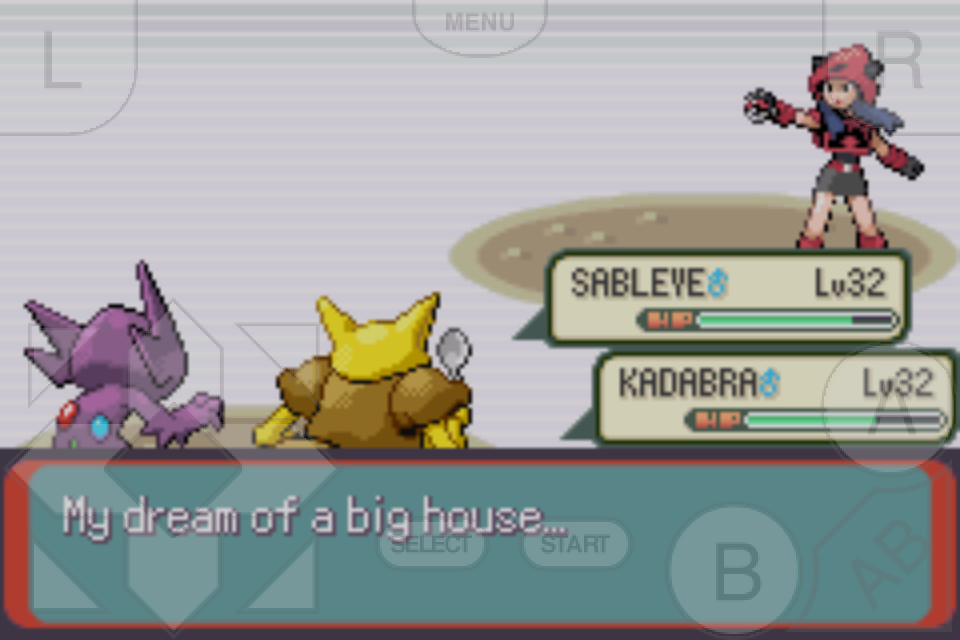
Hack Pokemon Emerald on gpSPhone 7.1.3 with Cheats


After wanting to tryout Gameboy Advanced on my iPhone, I decided the only game I'd really even bother to waste my time playing would be Pokemon. I searched for the last release of an official Pokemon for Gameboy Advanced and I soon came to the conclusion that it was Pokemon Emerald.

Now if you don't know what I'm talking about when I mention an emulator on the iPhone for Gameboy Advanced, you probably wouldn't be here. The emulator is called gpSPhone developed by ZodTTD, you should really check him out, he's a truely devoted guy and has provided the homebrew community with all sorts of ports, thanks ZodTTD!

Now I'm going to explain to you how to use a Pro Action Replay or Gameshark code with gpSPhone 7.1.3. gpSPhone has a maximum limit of 8 cheat codes per file, so make sure you only use up to eight at any given time. The format is simple, you put the description of the cheat code on one line, then the actual code on the following line. If you are using more than one cheat be sure not to put any empty lines between them.

Note: Here are the cheat codes, I've tested them and they work, some require to enter/leave an area to activate, others require a button combination input. After you use some of the warp codes to get to certain Pokemon, you should disable the code otherwise you'll keep teleporting every time you leave the area.

Cheats must be saved in a text file named the same as your rom, such as:
pokemon_emerald.gba.cht
The .cht extension is important otherwise the cheats won't load. If you saved the text file as .txt, rename the extension to .cht. Also remember, this filename is CaSe SeNsItIvE, it must match the rom file name, with the added .gba.cht of course!

Also remember to use gpSPhone 7.1.3, any other version will not work properly. The location to place the .cht file is:
/var/mobile/Media/ROMs/GBA/

Cheat codes:
999 Masterballs (PC Slot)
128898B6 EDA43037
999 Rare Candies (PC Slot)
BFF956FA 2F9EC50D
999 Full Restores (PC Slot)
20EFBA67 6E5BEFAE
Infinite Money
C051CCF6 975E8DA1
No Random Battles
2C5490D9 EB69CACB
Safari Zone
28C0A6F2 8513BE9A
Top of Sky Pillar (Rayquaza)
37A21411 E441F3EA
Faraway Island (Mew)
8DEB234A 4C8DC5EC
Navel Rock (Lugia)
842CB8A9 7F8B0149
Birth Island (Deoxys)
4A99A22B 58284D2D

Make Latias appear, must be enabled in displayed order:
Southern Island (Latias) 1
7703F025 00394020
Southern Island Latias Enabler 2
181690CB 4E53CB05

Catch anyone's Pokemon, press L+R when you see the Pokemon you want and then catch it, must be enabled in displayed order:
Catch Trainer 1
B6C5368A 08BE8FF4
Catch Trainer 2
B8D95CFE 06ED6EA1
Catch Trainer 3
E151C402 8A229A83
Catch Trainer 4
8E883EFF 92E9660D

Encounter certain Pokemon in the wilderness, enable all for the Pokemon wanted in order:
Deoxys Encounter 1
25214170 0AB256A2
Deoxys Encounter 2
FFA6733C EE552E68
Deoxys Encounter 3
2E7B7A58 D0781742
Deoxys Encounter 4
798A3738 3F94DB5D
Charizard Encounter 1
25214170 0AB256A2
Charizard Encounter 2
547D682A C32E071E
Charizard Encounter 3
2E7B7A58 D0781742
Charizard Encounter 4
D52902CA 343CF38A
Dragonite Encounter 1
25214170 0AB256A2
Dragonite Encounter 2
EF4835B3 519FF2C8
Dragonite Encounter 3
2E7B7A58 D0781742
Dragonite Encounter 4
D52902CA 343CF38A


Saturday, January 7, 2012

NDAA Activists Arrested in Grand Central Terminal


Yesterday, January 6th 2012, there was a protest in Grand Central Terminal against the National Defense Authorization Act which contains an amendment authorizing the military to detain American citizens indefinitely without due process, current US president Barack Hussein Obama signed this bill, it is written to allow the detention of US citizens domestically and abroad as well as foreigners, without trial.

In the video you can see protesters shouting about the NDAA bill and attempting to inform commuters at Grand Central Terminal, an educational move on their behalf. The first person to be arrested for speaking out was Lauren Digioia, the police drag her away from the scene shoving everyone in their way, everyone goes silent, not sure of what they should do next...

Shortly after Lauren was removed, a man named Zach Kamel, raised his voice, along with other protesters, to express their outrage against the arrest of Lauren for exercising her first amendment right, quickly after he starts to speak out about what has just occurred he too is arrested and taken away from the scene. I believe this is what you would call a police state, where you cannot speak up or speak out about certain policies in large numbers within a group, the leaders and the voices of the people who have the courage to speak out in public are targeted and shut up by force.

I understand the need to keep certain military affairs under wraps, but this is public knowledge which is law, why would these folks be persecuted for speaking about it?

America is speaking out and this is how they are greeted, who's next?